Create the right harmony for every part you write. You write the tune. HarmonyKeen writes the parts around it using the voice-leading rules arrangers use. The musical decisions stay with you. When it sounds right, move the finished parts straight into your DAW.
Start with the melody. Listen to the harmony take shape.
Hear the original melody, then discover three very different kinds of harmony HarmonyKeen can build around it.
Four-Part (SATB)
Sometimes one more voice is enough. Sometimes the arrangement calls for four.
Your melody is the tenor line here, and HarmonyKeen writes the other three parts around it, two above and one below. Give the four parts to any instruments, or mix them in one arrangement.
Example
Ridgeway
Key
F major
Sound
Piano
Ridgeway
Play the melody, then generate the harmony.
Melody Harmony (3 parts)
Melody only
With harmony
Four parts, from one tune. Here’s the same idea with chords underneath, and then with just one companion line.
Full Chords
Chords underneath, so one line sounds like a band.
In this example HarmonyKeen puts two voices below the saxophone and fills out the chord under every phrase. The line you played stays as you wrote it.
Example
Pocket
Key
E minor
Sound
Saxophone
Pocket
Play the melody, then generate the harmony.
Melody Harmony (2 parts)
Melody only
With harmony
Classic Harmony (Thirds)
A second line that moves with yours.
Here HarmonyKeen writes a second guitar part a third below the lead, so the two move together as one harmonized line. Use the same approach for another instrument, a voice, or several parts in the arrangement.
Example
Sparkler
Key
G# major
Sound
Two Guitars
Sparkler
Play the melody, then generate the harmony.
Melody Harmony
Melody only
With harmony
Keep listening
There’s a lot more to hear.
We’ve created a whole page of examples like these. Every style has a character of its own.
The same melody and the same settings give you the same result, every time.
That predictability is the point. In a market where generative tools produce different output on every run — sometimes brilliantly, sometimes not — a rule-based engine gives you something to reason about. You can understand why it made a particular choice, which means you can adjust the settings and predict the outcome rather than re-rolling until something sounds acceptable.
You have a tune. Maybe you hummed it, maybe it's a MIDI clip from a session, maybe you played it on a keyboard. On its own it's one line. HarmonyKeen takes that one line and writes the other parts a musician would write to go with it, so it stops being a tune and becomes an arrangement.
"Other parts" means real musical lines, not a chord stamp. A second voice moving alongside yours. Up to three harmony parts around it, above, below or both. Chords underneath, so one instrument sounds like a band. A countermelody that answers yours. A low drone holding the ground. You choose which, how many voices, and whether they sit above or below. HarmonyKeen works out the notes using the rules that take arrangers years to learn.
Then it's yours. Every part is a track you can hear, mute, reshape, or drag note by note, on a piano roll or on a page of sheet music. Try as many styles as you like. Your melody stays exactly as you wrote it, and nothing you tried is lost. When it sounds right, take the parts out: into your DAW, onto a printed page, or into your notation program.
The songwriter. "I wrote the melody. Help me build the rest of the song around it."
The studio producer. "Put each harmony part on its own track in my project, and I'll take it from there."
The bedroom producer. "I've got a laptop and a tune. I want it to sound like a whole song, without a fight."
The composer for film and TV. "I have the theme and a deadline. Give me the parts around it, tonight."
The guitarist. "I want a second guitar part to go with mine, and I want it to move right."
The choir or worship leader. "I've got the melody for Sunday. I need the parts for the whole choir, on paper, ready to print."
The singer recording alone. "Write me the harmony parts. I'll sing every one."
The hobbyist. "I make music at home, for me. I want it to sound like more than I can play at once."
The student, and the teacher. "Show me what the harmony should be on this tune, so we can see why."
03 / Foundation
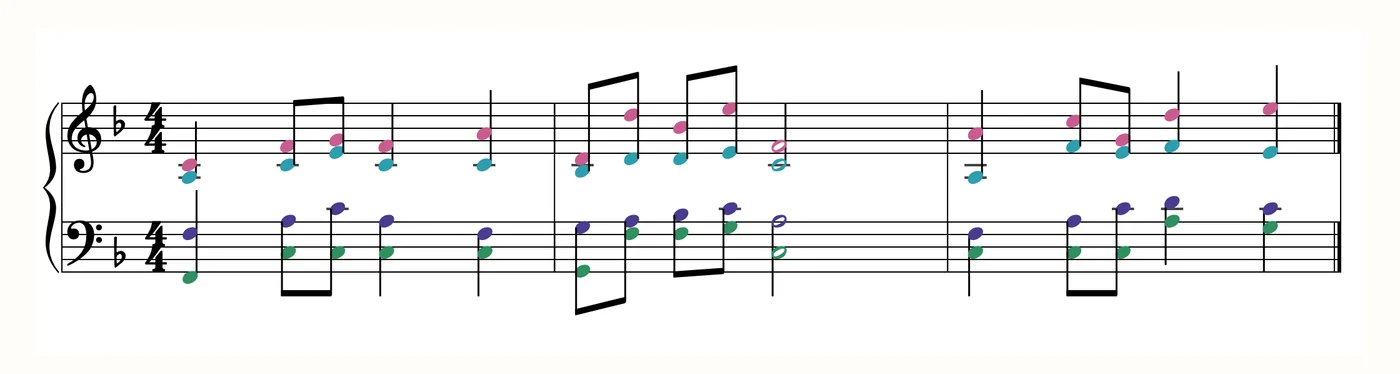
Deeply rooted in real music theory.
You don't need to know any of it to use HarmonyKeen.
The theory works underneath the surface, so you can stay focused on what the arrangement needs.
Three bars of Ridgeway, as HarmonyKeen wrote them.
04 / Workflow
Melody in. Harmony out. You decide.
Choose a musical direction, shape every part, then move the arrangement straight into your DAW.
The process, start to finishYour melody, arranged
01
Bring in your melody
Import MIDI, write in the piano roll, or play it from a keyboard.
Key detection HarmonyKeen listens to your melody and works out the key on its own.
02
Choose a direction
Start with the harmony style that fits what you’re writing.
Across genres Pick the sound you’re after. Smooth and professional, rich and soulful, open and modern, or that classic vocal group blend.
03
Make it yours
Keep the generated harmony exactly as it is. Or go further: shape the notes, chords, voices, and sound until it sits right.
Explore freely Try as many directions as you want. Your melody never changes, and every version you try stays there to come back to.
04
Into your DAW, or onto the page
Take the complete arrangement, separate parts, or harmony alone.
Export A simple click, or drag it straight into your session. Print it as a page, or open it in a notation program. Every part arrives time-aligned with the melody you brought in.
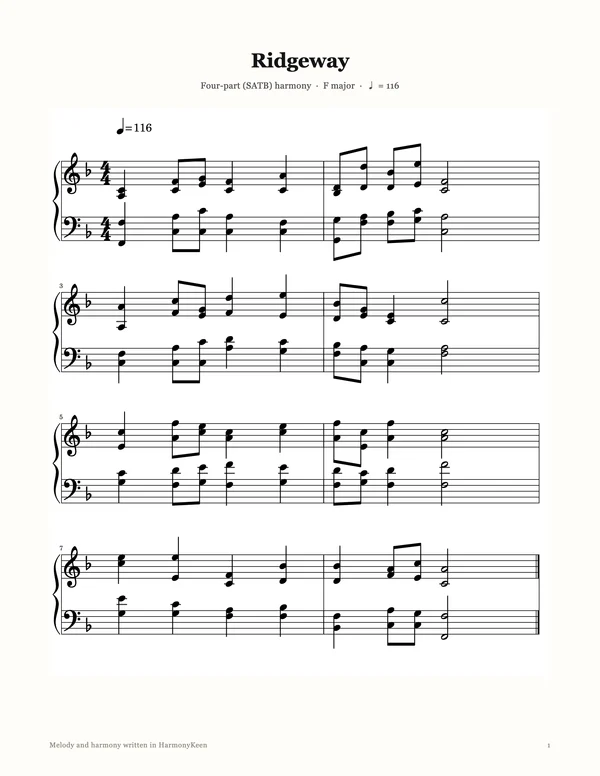
HarmonyKeen writes the whole thing out as sheet music, laid out like piano music on two staves, in your key and your time signature. Put it on a stand. Read it on screen while it plays, drag a note on the page to change it, and print it when it's right. Or send it to MuseScore, Sibelius, Finale or Dorico with the notes still editable.
The Ridgeway demo from above, on the page: the score view in the app, and the PDF it exports.
06 / Musical directions
Start with one melody. See where it can go.
Your melody. It stays exactly as you played it.
One or more companion lines
Interval harmony
Classic Harmony (Thirds)Close parallel 3rds
Wide Harmony (Sixths)Wider parallel sixths
Open ThirdsA 3rd and an octave framing your melody
Fifths & OctavesThe power-chord sound, bold and open
Several connected voices
Chords and multi-part writing
Full ChordsFull, stable chords built around your melody
Four-Part (SATB)Your melody becomes one of four voices, soprano to bass
Close Harmony (Barbershop)Tight, resonant vocal blend
Smooth ChordsPolished chords that glide between changes
Jazz Voicings (Open)An open, floating, modern jazz sound
Soulful ChordsThe warm sound of gospel and soul
A second melody
Independent parts
Counter MelodyAn independent second melody that answers yours
07 / The details
What you're installing.
Requires
macOS 11 or later, on Apple Silicon. Windows 10 version 2004 or later, 64-bit.