Skip to content
HarmonyKeen

Features

Software that harmonizes a melody.

You bring a melody. HarmonyKeen writes the parts around it, works out the voice leading, and lets you change any of it. Then it hands the finished parts to your DAW, or to the page.

One melody, first on its own and then with the parts HarmonyKeen wrote around it.

Four-Part (SATB)

Sometimes one more voice is enough. Sometimes the arrangement calls for four.

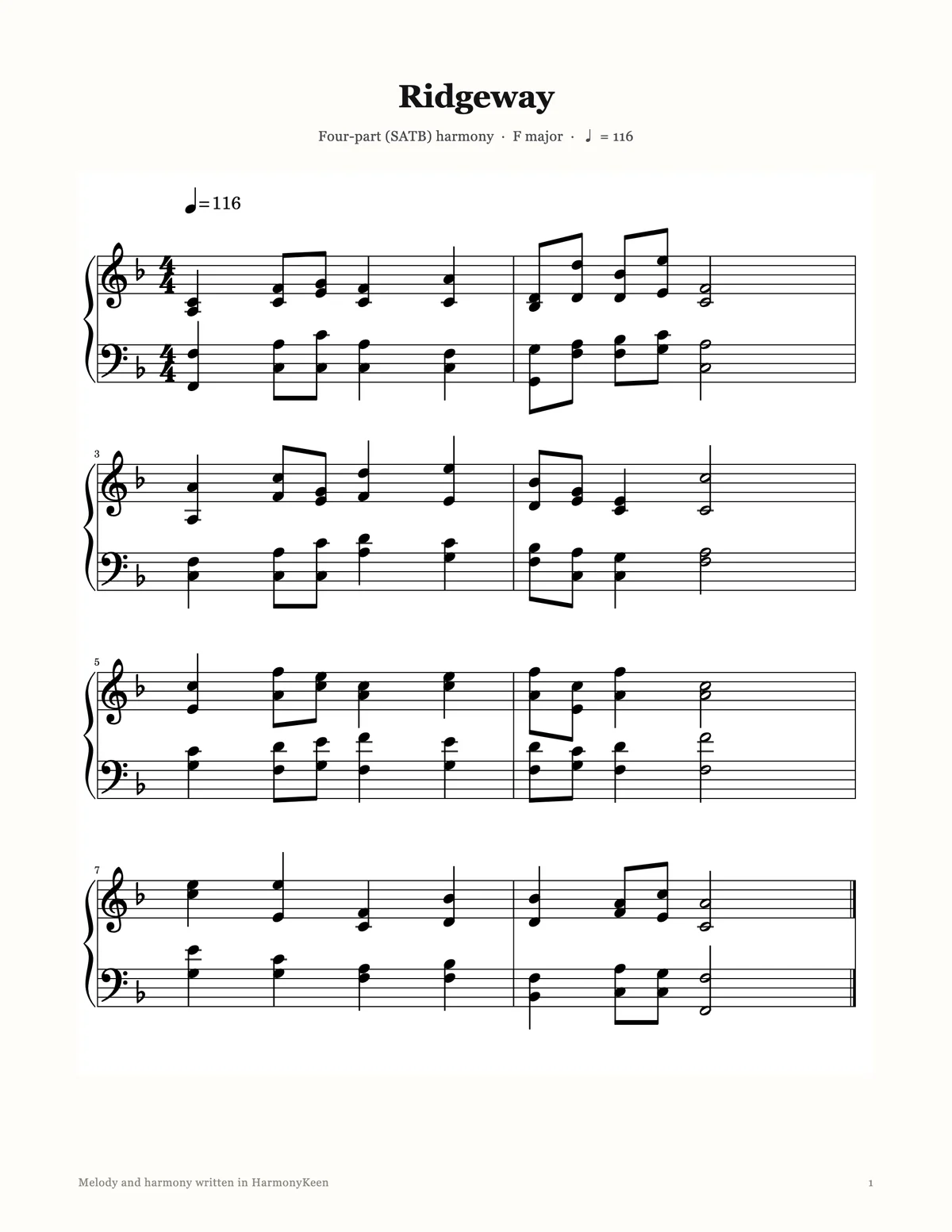
Your melody is the tenor line here, and HarmonyKeen writes the other three parts around it, two above and one below. Sing the parts, play them with instruments, or combine both in the same arrangement.

Ridgeway

Play the melody, then generate the harmony.

Melody Harmony (3 parts)
Melody only
With harmony
Keep listening

Every style has a character of its own.

We have a whole page of examples like this one, each melody on its own and then harmonized.

Hear more

01

It writes the parts.

You bring one line. The engine reads it, works out where it is, and writes the others around it.

Styles

One melody. Many ways to hear it.

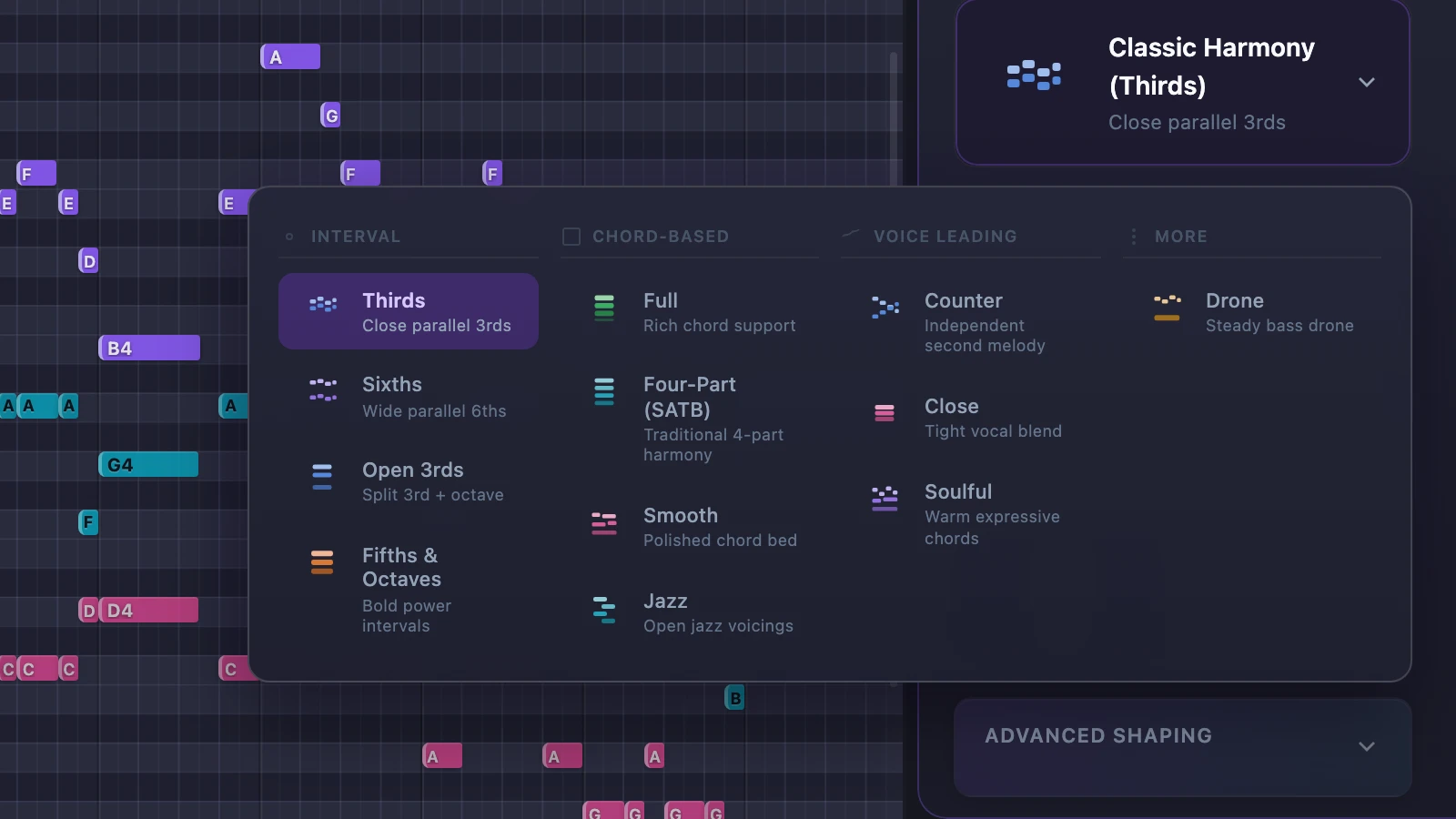
A companion line in thirds or sixths. Full chords underneath. Four-part writing with your tune inside it. A counter melody that answers yours. Gospel warmth, barbershop close harmony, open jazz voicings, a drone bass. Switching is one click, and your melody never moves.

The HarmonyKeen style picker open, showing harmony styles grouped as interval, chord-based, voice leading and more

The key

It works out the key before it writes a note.

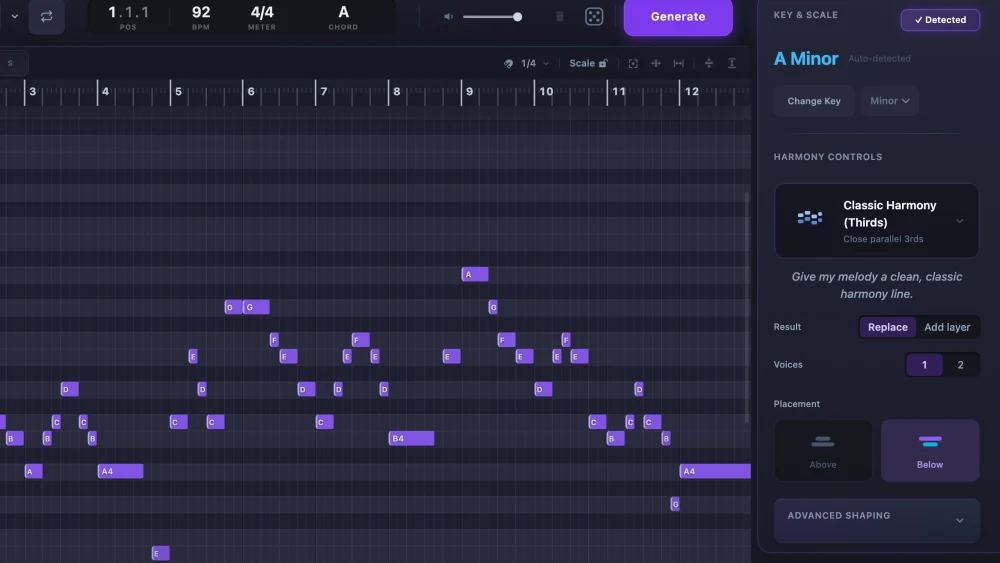
It detects your melody’s key accurately, and you can overrule it whenever you like.

The HarmonyKeen key and scale panel, showing A Minor detected automatically beside the harmony controls

Voice leading

Parts that move the way a musician would move them.

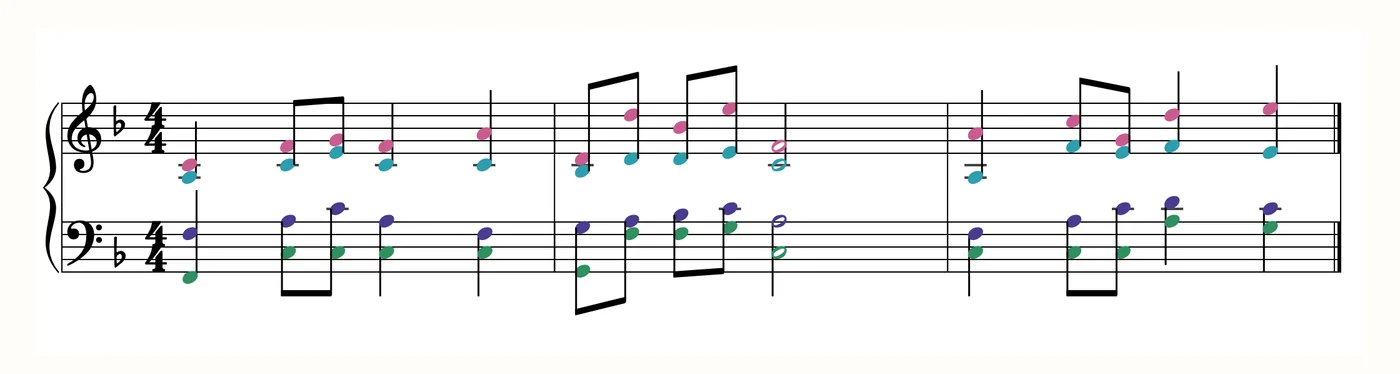
Chords are chosen for your melody as a whole rather than one beat at a time, and each voice is led from one chord to the next.

Three bars of the Ridgeway demo on a grand staff in F major, the melody in violet with three harmony parts in pink, teal and green around it
Three bars of the demo above, as HarmonyKeen wrote them.

Same melody, same settings, same harmony.

Generate the same part twice and you get the same part. Try anything you like, change your mind, and go straight back to what you had.

02

You decide what it says.

Nothing it writes is final. Change one chord, or every note.

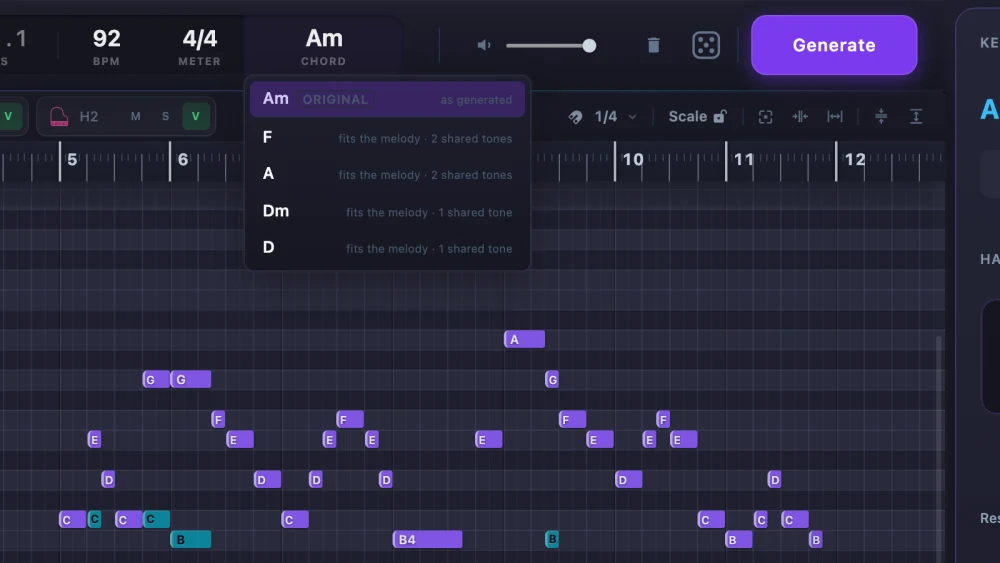
The chord readout menu open in HarmonyKeen, listing alternatives to an A minor chord

One chord

Change one chord without touching the rest.

Click the chord name and pick another that fits. The alternatives are ranked by how well they suit your tune, and the original is always one click back.

Every note

Or move any note by hand.

Drag, trim, add and delete on the grid. Nudging a note keeps the feel of how it was played rather than snapping it to the beat.

03

Then it leaves the app.

Onto the page, or into the session you were already working in.

Sheet music

Real sheet music, and it is live.

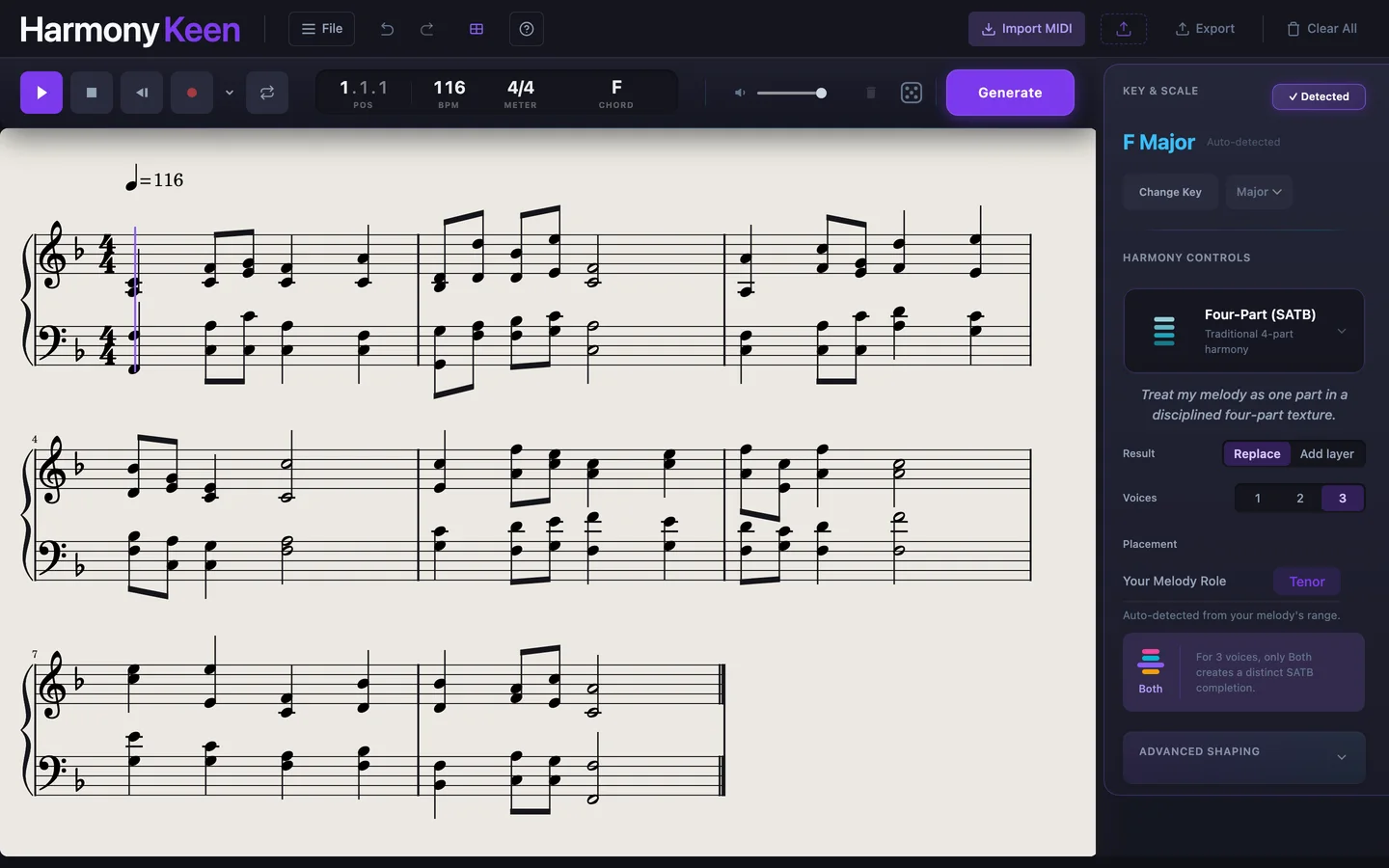
Switch views and your work is engraved on a grand staff. Drag a notehead or set a length and the grid and the export change with it. Notes are split between the hands the way a pianist would split them.

The HarmonyKeen score view, showing the generated harmony engraved on a grand staff

On paper

Print it, or open it in your notation program.

Save a PDF with real engraving, or export MusicXML for MuseScore, Dorico, Sibelius or Finale.

An exported HarmonyKeen score as a printed page, engraved on US Letter

Into your DAW

Every part, time-aligned, on its own track.

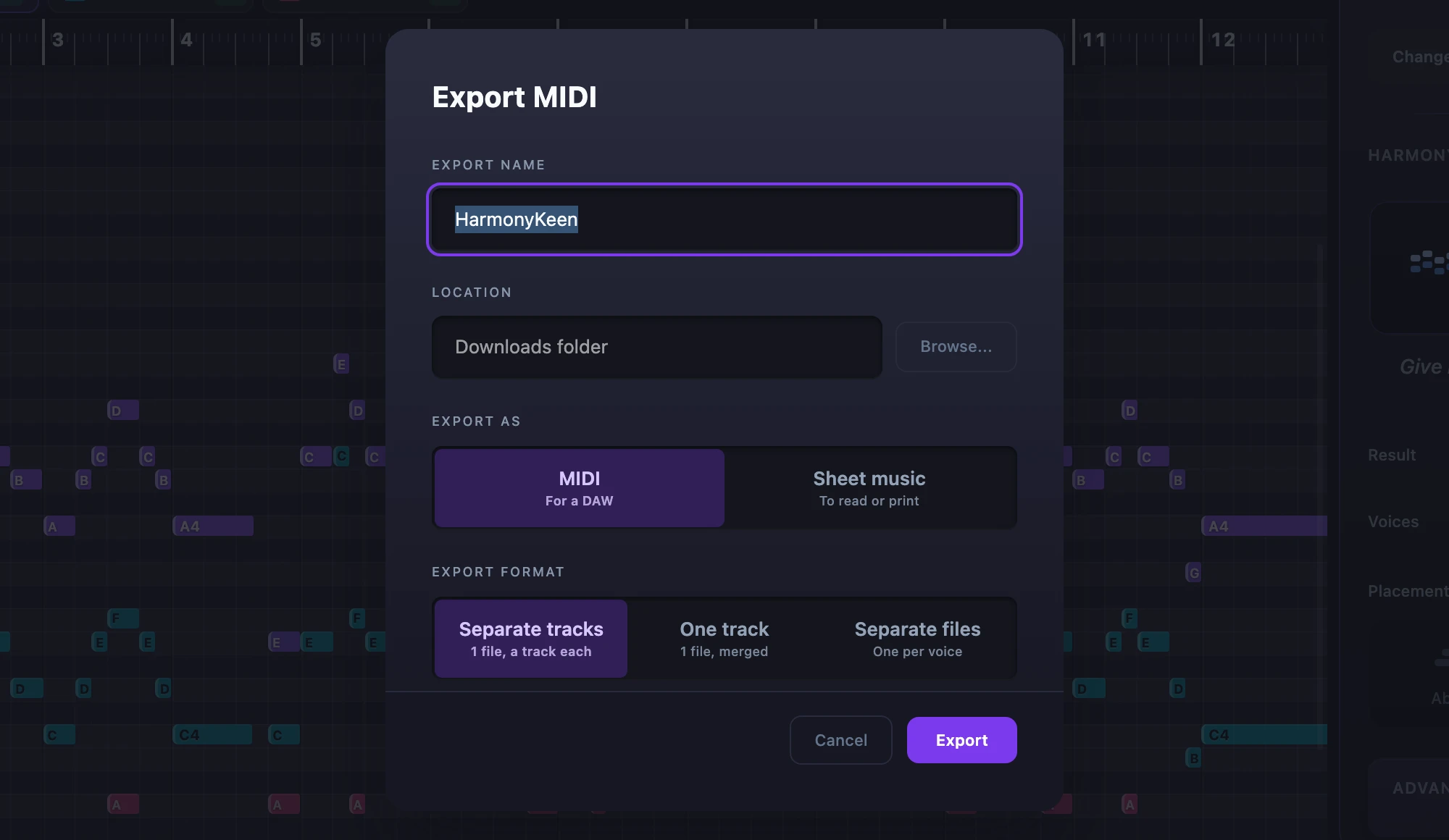
Export as one merged track, as separate tracks in one file, or as a file per voice, with or without the melody. Or drag MIDI straight from the header onto a track and skip the dialog.

The HarmonyKeen export dialog, offering MIDI or sheet music, and separate tracks, one track or separate files

04

Also a VST3 and Audio Unit plugin.

Formats
VST3 and Audio Unit

Included with every license

Runs in Logic Pro, Reaper, GarageBand and most VST3 hosts. Capture a melody from your song, generate the parts, and hear them play through the instrument on the track while your transport runs. Each voice drags out onto its own named track, and your work is saved inside the DAW project.

That is the shape of it. The rest is detail, and it is all below.

05

The full list.

Everything above, plus everything that did not need a picture.

Getting your melody in

Draw it
Straight onto the piano roll. No file, no setup.
MIDI import
Bring in a monophonic melody from a MIDI file.
MIDI keyboard
Play your melody in live from a connected keyboard.
Capture from your DAW
Record a melody straight off a track in your session, at your song’s tempo.

How the harmony is written

Key override
Set the key yourself, from a circle of fifths.
Scale Lock
Keeps every written note inside the scale you chose.
Phrase endings
The chords come to rest where your melody does, so a section sounds finished instead of cut off.
Deterministic output
The same melody and settings always give the same harmony.
Randomize
One press picks a style and voicing. It never touches your melody.

Shaping and judging it

Voices
How many harmony parts to write, from a single companion line to several.
Placement
Put the harmony above your melody, below it, or both.
Advanced shaping
Tune duration, spread, closeness, humanizing and role detection, so one style can sound tight or open.
Layer or replace
Generate a new version over the last one to compare, or replace it outright.
Mute, solo and hide
Available on every harmony part, and on your melody.
Live chord readout
The chord name is displayed in real time at any point where the playhead rests.

Real music notation, or MIDI in your DAW

Proper engraving
It follows music notation standards, so a page reads the way printed music should.
Articulation and dynamics
Slurs, staccato, tenuto, accents and dynamics. They print, and they carry into MusicXML.
PDF export
A print-ready page, properly engraved.
MusicXML export
For MuseScore, Dorico, Sibelius or Finale.
Three MIDI shapes
One merged track, separate tracks in one file, or a file per voice.
Drag straight into your DAW
Pick the parts up from HarmonyKeen and drop them on a track. No export dialog, no file to go find.

Ownership and privacy

Works offline
Writing, generating and exporting never contact us.
No account
Nothing to sign in to. A license is verified on your own computer.
Commercial use
The harmonies, MIDI and project files are yours to release and sell.
Project files
Save notes, tempo, key, style and every setting. Auto-save keeps a copy as you go.
Updates ask first
Nothing installs itself. The app asks before it even checks.

Hear it do all of this.

The demos are the shortest way to tell whether it writes the kind of harmony you want.

Try it free for seven days

Requires
macOS 11 or later, on Apple Silicon
Included
The app, plus VST3 and Audio Unit plugins
Your license
One purchase, every version 1 update included, and a 14-day refund