iPad
HarmonyKeen for iPad
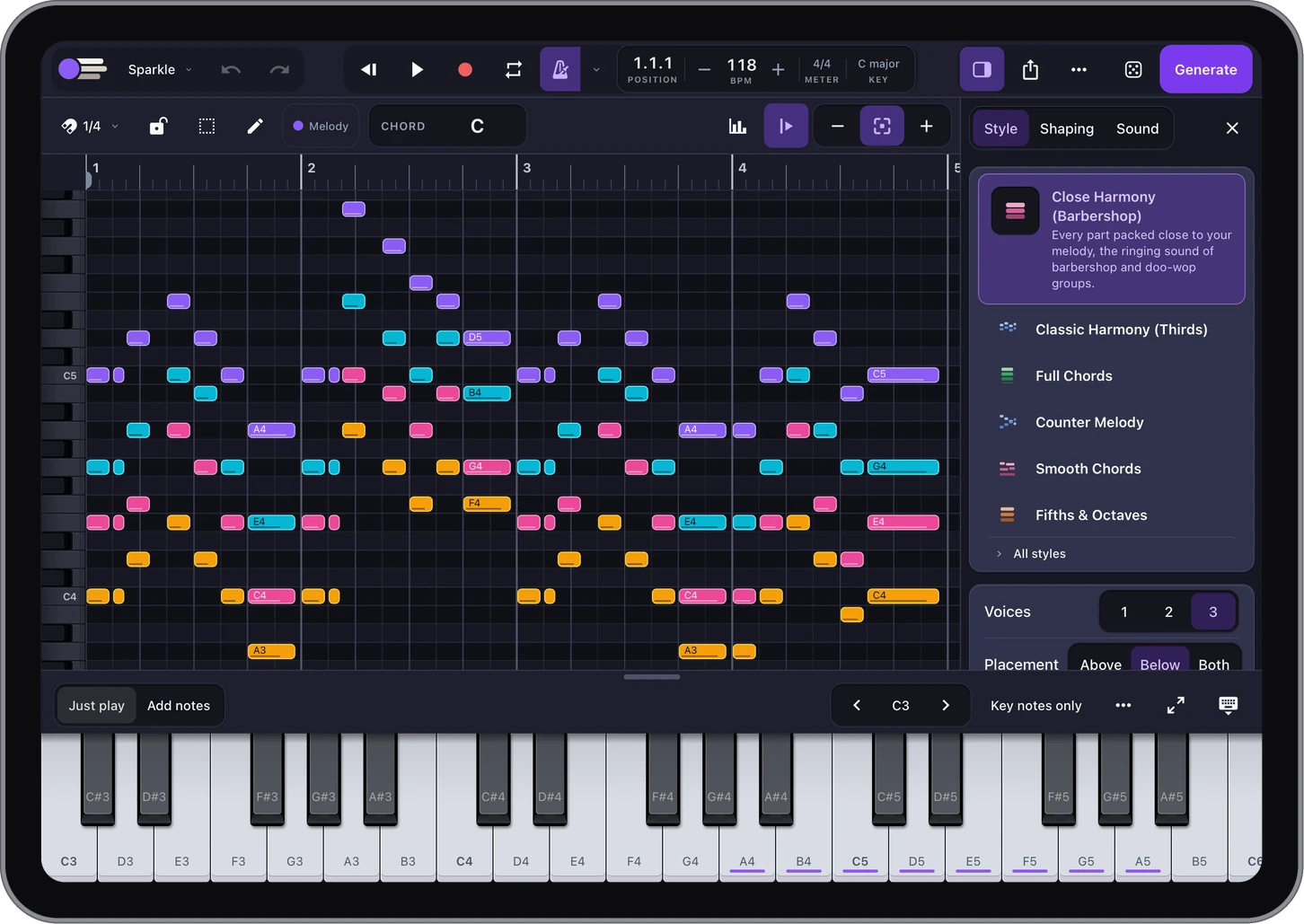
Write the melody on your iPad. HarmonyKeen writes the harmony parts around it, from the rules of harmony musicians study, and every note stays yours to change.

01 / On your iPad
From melody to finished parts.
-
Enter a melody
Play it on the on-screen keyboard, draw notes with your finger or Apple Pencil, record it in time with the metronome, or import a MIDI file.
-
Choose a style
Thirds and sixths, full chords, four independent parts, close harmony, smooth and soulful chords, jazz voicings. Choose how many parts and where they sit: above your melody, below it, or both, as the style allows. In some styles you can also shape how the parts move: how far they may leap, whether they avoid or allow parallel fifths and octaves, and how closely they follow classical voice leading.
-
Make it yours
Swap any chord for another that fits. Edit notes on the grid or right on the score. Undo and redo your edits.
-
Inside your music apps
HarmonyKeen also comes as Audio Unit plug-ins: a MIDI effect in apps such as Logic Pro for iPad, Cubasis and AUM, and an instrument in GarageBand. It follows the song, so the harmony plays along with your track.
-
Take it with you
Export each part as its own MIDI file, or the whole arrangement as MusicXML or a PDF to print. Save projects to Files, including iCloud Drive.
-
Made for touch
Drag notes with a finger or Apple Pencil. Left-handed? One setting moves the editing tools to the other side of the screen, so your drawing hand doesn't cover them.
02 / The plain facts
No surprises.
One purchase on the App Store. No subscription, no account, no ads. It works offline, and no data is collected. The harmony comes from music-theory rules, not AI, so the same melody with the same settings always gives the same result.
03
From the beta
No more hunting and pecking piano roll lanes! Great auto harmony with several varieties which you can then alter and edit. On an iPad this tool is a quality of life improvement for anyone arranging.
I have melodies in my head. … it's difficult for me to pick out chords on my own. Now, thanks to you, my melodies will have beautiful harmony.
It's … a unique way to find unexpected chord progressions that I can put to use with other apps.
Inputting your own melodies is … great to feel ‘ownership’ of the results which is NOT something most generators allow.
What surprised me most was that a beta app in development worked so well right away. Controls were not glitchy. Most parts involving recording of notes, setting up harmonies, etc. all went smoothly.
Seems pretty slick, I liked the very flexible export options for example.
What has kept me interested in it is that there is some play in the results. Sometimes unexpected harmonies…
The ‘divisi MIDI’ (splitting parts across midi channels in a single MIDI file) is a highly valued feature for creating [fast] ‘cinematic’ compositions.
04 / Questions
Before you get it.
Does my Mac or Windows license work on iPad?
No. HarmonyKeen for iPad is a separate app, bought on the App Store.
What do I need?
An iPad running iPadOS 18 or later. The app is in English.
Can I move my work between my iPad and my computer?
Yes, as MIDI. Export a MIDI file on one and import it on the other; the iPad can also export each part as its own file.